
Compare
Split, a focused alternative to Rectangle and Magnet
Split is a Rectangle and Magnet alternative for two-window work. Two windows, one shared divider: drag it and both sides resize together. $4.99 once.
How it compares
Rectangle and Magnet help a lot of Mac users snap windows into place. Split is narrower. It is a menu-bar app for pairing two windows on the current display: shortcuts, drag-to-snap, and a linked divider so both windows resize together. This page states what each app is good at, using public information checked on November 9, 2026. It is not a ranking.
Who each is for
Pick Rectangle if you want a free, open-source window manager with keyboard shortcuts that cycle through window sizes, drag-to-edge and corner snapping, and builds for older macOS versions. Rectangle Pro is a separate paid app that adds custom shortcuts for any size and position.
Pick Magnet if you want a Mac App Store purchase with trigger areas, keyboard shortcuts, unlimited custom commands, and optional iCloud sync, sold as a perpetual license with no subscription.
Pick Split if your day is mostly two windows side by side or stacked, and you want one shared divider that resizes both at once, plus a one-click swap. Split does not try to be a multi-tile grid or a Spaces manager.
What Split does
- Set a proportion, then place the focused window with a menu action or shortcut.
- Drag a window into a snap zone, preview the layout, and let go.
- Drag the white shared divider so both paired windows resize together, left–right or top–bottom.
- Click the divider to swap both sides, including their window stacks.
- Stay in the menu bar. Accessibility access is used only for the window actions you trigger.
What Split does not do
- Manage Spaces or multiple desktops.
- Offer a large grid of custom tiles.
- Match every Rectangle Pro feature.
- Show ads or run analytics inside the Mac app. The public website uses limited Umami page statistics, described in the Privacy policy.
Feature comparison
| Feature | Split | Rectangle | Magnet |
|---|---|---|---|
| Price | $4.99 one-time | Free and open source. Rectangle Pro is a separate paid app. | $4.99 on the Mac App Store |
| License | One-time purchase, no subscription, updates included, one active Mac at a time | Open source (free version) | Perpetual license, no subscription, no in-app purchases |
| Keyboard shortcuts | Yes | Yes, repeat to cycle sizes | Yes, customizable |
| Drag to snap | Yes, snap zones with a preview | Yes, screen edges and corners | Yes, trigger areas |
| Custom sizes | Choose a proportion; Split remembers it | Built-in layouts; custom shortcuts for any size and position in Rectangle Pro | Unlimited custom commands |
| Shared divider that resizes two windows together | Yes. Drag it to resize both; click to swap sides | Not listed on its official site | Not listed on its App Store page |
| System requirements | macOS 13 Ventura or later, Apple silicon and Intel | macOS 14 or later (older versions available for earlier macOS) | macOS 13.0 or later |
"Not listed" means we did not find the feature on the app's official pages. It does not mean we tested the app.
Sources: rectangleapp.com · Rectangle on GitHub · Magnet on the Mac App Store
How the linked divider feels
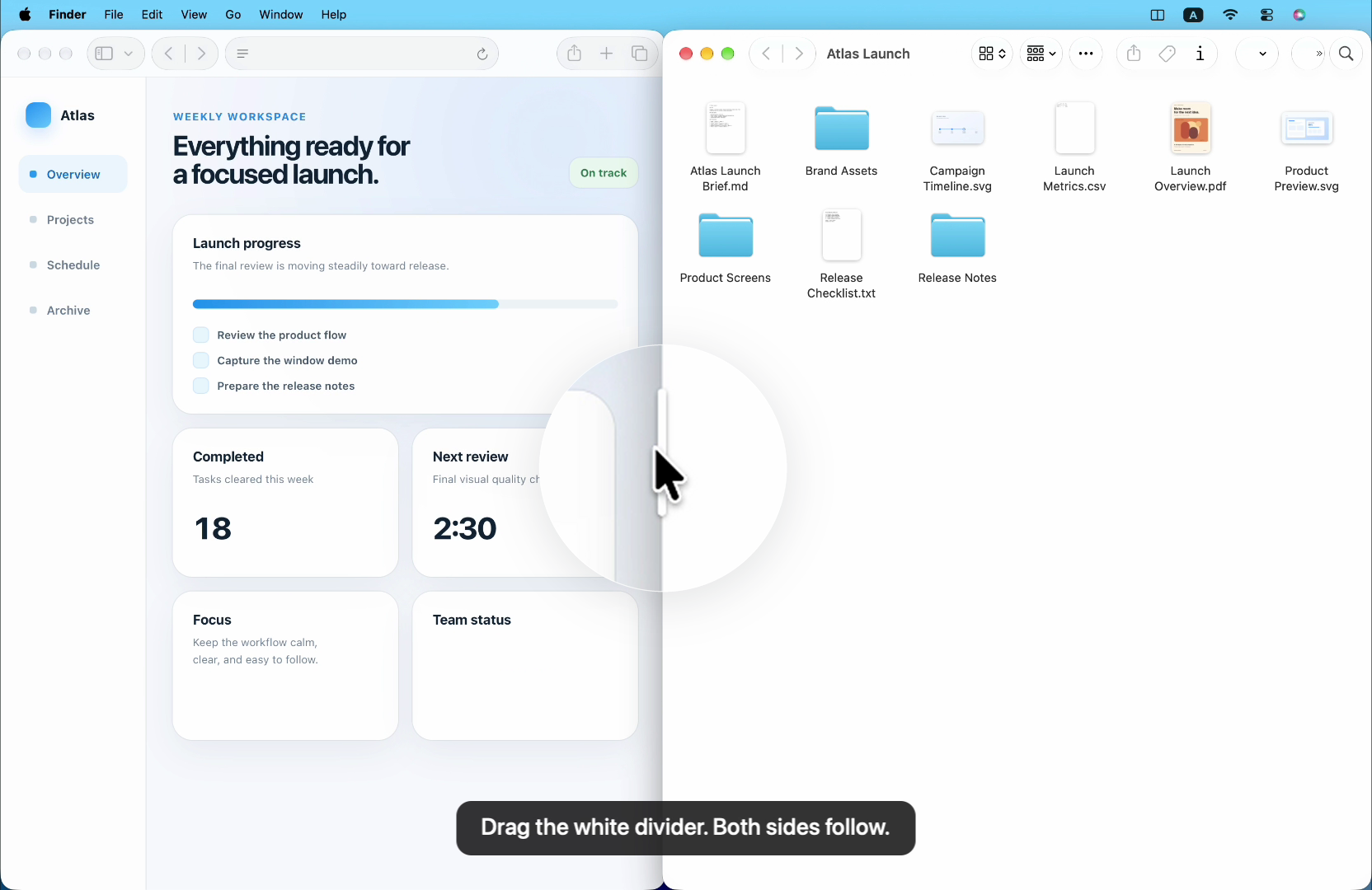
After two windows are paired, a white divider sits between them. Pull it and both sides follow. Click it once to swap. That is the main reason someone who already knows Rectangle or Magnet might still try Split.
FAQ
Is Split a Rectangle alternative?
Yes, for two-window work. Like Rectangle, Split places windows with shortcuts or drag-to-snap. It also adds a shared divider that resizes both paired windows together, plus a one-click swap. Rectangle is free and open source; Split is a $4.99 one-time purchase focused on pairing two windows.
Is Split a Magnet alternative?
Partly. Magnet offers trigger areas, keyboard shortcuts, and unlimited custom commands from the Mac App Store. Split also snaps and uses shortcuts, but its main difference is the linked divider: drag one bar and both windows resize together. Split is not a grid of many custom tiles.
Does Split resize two windows at once?
Yes. After two windows are paired, drag the white shared divider and both sides move together. Click the divider to swap sides. This works on the current display; Split is not a Spaces manager.
How much does Split cost?
$4.99 USD, one-time. No subscription. One license is active on one Mac at a time, and you can move it to a replacement Mac. Split runs on macOS 13 Ventura or later, on Apple silicon and Intel.
Try the two-window workflow
Split is $4.99 USD, one-time, with future updates included on one active Mac.
Get Split — $4.99 onceQuestions? Visit Support or read the Privacy policy.
Prices and system requirements change. Details were checked on November 9, 2026. Rectangle and Magnet are trademarks of their respective owners. This is an independent comparison by Split and is not affiliated with either app.